
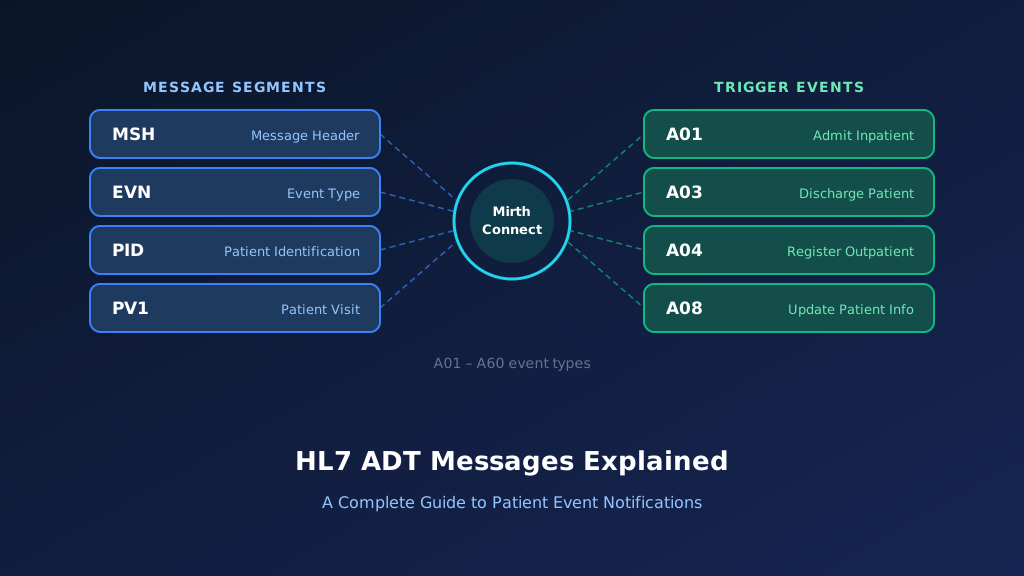
The HL7 A31 message is an Admit, Discharge, Transfer (ADT) event used to communicate updates to person information across healthcare systems. Known as ADT A31 or Update Person Information, it allows patient registration applications, enterprise master patient indexes, EHRs, and other connected systems to synchronize demographic and identity-related information.
Unlike an A28 event, which adds person information, A31 updates information associated with an existing person record. The update may involve a corrected name, address, telephone number, date of birth, or other supported demographic fields.
Accurate A31 processing helps healthcare organizations maintain consistent patient identities without creating duplicate records or unnecessarily changing active encounters. This guide explains HL7 A31 message structure, segments, examples, field mapping, Mirth Connect implementation, acknowledgment handling, and troubleshooting.
What Is an HL7 ADT A31 Message?
An HL7 ADT A31 message communicates changes to person-level information maintained by a healthcare application. It belongs to the HL7 Version 2 patient administration event family and supports synchronization between systems that maintain patient identities.
A31 is commonly associated with demographic corrections, contact information changes, and updates to person records that are not necessarily tied to a particular admission or visit.
The receiving application identifies the existing person record and applies the permitted changes according to the interface specification. Understanding A31 within the broader HL7 ADT messaging framework helps integration teams distinguish person-level updates from encounter-specific modifications.
Purpose of the HL7 A31 Event
A31 communicates updates to existing person information. Receiving applications use the event to synchronize supported demographics and identity attributes without automatically creating an admission or new encounter.
When Is an ADT A31 Message Generated?
An A31 notification may be generated when authorized staff correct a person's name, address, contact details, or other information in a registration or identity management application.
Which Healthcare Systems Receive A31 Messages?
EHRs, enterprise master patient indexes, patient portals, registration platforms, and healthcare data repositories may receive A31 messages to keep person information synchronized.
How A31 Supports Patient Data Accuracy
A31 helps connected applications maintain consistent demographic records. Accurate updates reduce mismatched contact information, inconsistent patient searches, and administrative discrepancies.
Why Accurate A31 Processing Matters
Incorrect A31 processing can overwrite valid information, update the wrong patient, or create duplicate records. Reliable integration requires authoritative identifiers, field-level mapping rules, and event sequencing.
HL7 ADT A31 Message Structure and Segments
An HL7 ADT A31 message follows the segment-based format defined by HL7 Version 2. In HL7 v2.5, A31 uses the ADT_A05 message structure. Important segments include MSH, EVN, and PID, with additional demographic or administrative segments such as PD1, NK1, and PV1 depending on the message definition and implementation profile.
MSH identifies the event and source application, EVN provides event metadata, and PID carries the person identifiers and demographics. Because A31 updates person information, receiving applications should not interpret it as a new admission, discharge, or transfer.
MSH Segment: Message Header
MSH identifies the sending and receiving applications, message timestamp, control identifier, and HL7 version. MSH-9 identifies A31 as the update person information event.
EVN Segment: Event Information
EVN records event metadata, including the timestamp associated with the update. Receiving applications may use it for auditing and sequencing demographic changes.
PID Segment: Patient Identification
PID contains the person identifiers and demographic information being communicated. Accurate PID-3 matching is essential before applying changes to the destination record.
PD1 Segment: Additional Demographics
PD1 may carry additional demographic information supported by the implementation profile. Receiving systems should map these fields only when they are relevant and authorized.
NK1 and Other Optional Segments
NK1 may contain next-of-kin or associated-party information. Other segments can provide additional context, depending on the sending application and interface specification.
HL7 ADT A31 Message Example With Field Explanation
The following HL7 ADT A31 example illustrates a fictional patient whose address and telephone information have been updated in a registration system. The message uses HL7 v2.5 conventions and identifies ADT^A31^ADT_A05 in MSH-9. PID-3 identifies the existing person record, while PID-11 and PID-13 carry address and telephone information.
The example assumes that the receiving application already maintains the patient identifier. The destination should match the person record, validate the incoming fields, and apply updates according to its agreed demographic synchronization rules.
Complete HL7 ADT A31 Sample Message
MSH|^~\&|REGISTRATION|HOSPITAL|EHR|MAIN|20261013170000||ADT^A31^ADT_A05|MSG31001|P|2.5
EVN|A31|20261013165500
PID|1||P310001^^^HOSPITAL^MR||THOMPSON^SARAH||19880324|F|||456 MAPLE AVENUE^^CHICAGO^IL^60607^USA||^PRN^PH^^1^312^5550146
All patient information is fictional. The example represents an update to an existing person record. It does not imply that the patient has been admitted, discharged, transferred, or assigned to a new encounter.
Explore each segment and its key fields:
Illustrative ADT^A31 — HL7 v2.5 (fictional data)
Select a segment to see what it carries
MSH — Message Header
RequiredMSH identifies REGISTRATION as the sending application and EHR as the receiver. ADT^A31^ADT_A05 identifies the person information update event and message structure, while MSG31001 supports tracking.
| Field | Meaning | Value in this message |
|---|---|---|
| MSH-3 | Sending application | REGISTRATION |
| MSH-5 | Receiving application | EHR |
| MSH-7 | Message creation time | 20261013170000 |
| MSH-9 | Message type | ADT^A31^ADT_A05 |
| MSH-10 | Message control ID | MSG31001 |
| MSH-12 | HL7 version | 2.5 |
MSH Segment Explained
MSH identifies REGISTRATION as the sending application and EHR as the receiver. ADT^A31^ADT_A05 identifies the person information update event and message structure.
EVN Segment Explained
EVN identifies A31 as the event and records its timestamp. Integration teams can use this information to investigate when the demographic update occurred.
PID-3: Existing Person Identifier
PID-3 contains patient identifier P310001. The assigning authority identifies the issuing organization and helps the destination match the correct person record.
PID-5: Patient Name Information
PID-5 contains the patient's family and given names. Receiving applications should apply their agreed field update rules rather than assuming every populated field represents a changed value.
PID-11 and PID-13: Updated Contact Information
PID-11 contains address information, while PID-13 contains the telephone number. The receiving system should validate the values and apply permitted updates.
Important HL7 ADT A31 Fields and Mapping
Reliable HL7 A31 integration depends on accurate person matching and controlled demographic field updates. MSH-9 identifies the event, MSH-10 supports message tracking, PID-3 identifies the person record, and EVN-2 records event timing. PID-5, PID-7, PID-8, PID-11, and PID-13 commonly carry demographic information.
Receiving applications should distinguish fields that are unchanged, intentionally cleared, or updated. In HL7 Version 2, empty fields and explicit null values may have different meanings, depending on the agreed implementation profile. Clear HL7 v2 integration specifications help prevent unintended overwrites.
| Field | Description | Example | Integration Purpose |
|---|---|---|---|
| MSH-3 | Sending Application | REGISTRATION | Identifies source |
| MSH-5 | Receiving Application | EHR | Identifies destination |
| MSH-9 | Message Type | ADT^A31^ADT_A05 | Person update event |
| MSH-10 | Message Control ID | MSG31001 | Message tracking |
| MSH-12 | Version ID | 2.5 | HL7 parsing |
| EVN-2 | Recorded Date/Time | 20261013165500 | Event timestamp |
| PID-3 | Patient Identifier List | P310001 | Existing person matching |
| PID-5 | Patient Name | THOMPSON^SARAH | Name synchronization |
| PID-7 | Date/Time of Birth | 19880324 | Demographic information |
| PID-8 | Administrative Sex | F | Demographic information |
| PID-11 | Patient Address | Chicago, IL | Address synchronization |
| PID-13 | Phone Number - Home | Fictional number | Contact synchronization |
| PID-14 | Phone Number - Business | If populated | Additional contact details |
| PID-16 | Marital Status | If populated | Administrative information |
MSH-9: Identifying the A31 Event
MSH-9 identifies A31 as the trigger event. Integration engines should route it through person information update processing rather than person creation or encounter workflows.
PID-3: Matching the Existing Person
PID-3 contains patient identifiers and assigning authorities. Receiving applications should validate the complete identifier context before modifying demographic information.
PID-5: Updating Patient Names
PID-5 contains structured patient name components. Receiving systems should preserve family and given names and handle alternate names according to their data model.
PID-11 and PID-13: Updating Contact Details
PID-11 and PID-13 provide address and telephone information. Receiving applications should validate formatting, field repetitions, and destination-specific contact preferences.
EVN-2: Sequencing Demographic Updates
EVN-2 records event timing. Integration teams can use it alongside source event history to investigate delayed updates and prevent older demographic information from replacing newer values.
How HL7 ADT A31 Messages Work in Healthcare Integration
An HL7 ADT A31 workflow begins when an authorized registration or identity management application updates person information. The source application generates an A31 message containing the patient identifier and relevant demographic fields. An integration engine receives the message, validates its structure, and routes it to connected applications.
Receiving systems locate the existing person record and apply the supported updates according to their mapping and field ownership rules. The workflow should not automatically create a new admission or patient encounter. Reliable processing requires identifier matching, duplicate prevention, acknowledgment handling, and audit records.
Step 1: Person Information Is Updated
Authorized staff modify demographic or contact information in the source application. The system generates an A31 notification containing the relevant person details.
Step 2: Validate the HL7 Message
The integration engine validates the A31 event, patient identifier, message metadata, and supported demographic fields. Invalid notifications should enter an exception workflow.
Step 3: Match the Existing Person Record
The destination identifies the person using PID-3 and its assigning authority. Ambiguous matches should prevent automatic updates until the identity is resolved.
Step 4: Apply Authorized Field Updates
The receiving application updates permitted demographic fields according to its interface rules. It should preserve fields owned by other authoritative systems.
Step 5: Acknowledge and Audit the Update
The destination returns an acknowledgment under the configured processing mode. Audit records document the source event, matched identity, and update outcome.
How to Implement HL7 ADT A31 Messages Using Mirth Connect
Mirth Connect can receive, validate, transform, and route HL7 ADT A31 messages between registration systems, enterprise master patient indexes, EHRs, and other healthcare applications. A typical implementation receives an A31 notification through an MLLP listener, validates the event type, extracts patient identifiers and demographic fields, and sends the information to the destination's person update workflow.
Production interfaces must distinguish existing identifiers from changed demographic values. They must also handle repeating PID fields, explicit null values, delayed updates, and duplicate notifications. Organizations implementing these workflows can use Mirth Connect development services to support transformation, routing, validation, and monitoring.
Configure the HL7 Source Connector
Create a Mirth Connect channel using an MLLP Listener or another supported transport. Configure the HL7 v2.x inbound data type, secure connectivity, acknowledgment behavior, and message retention policies.
Filter HL7 ADT A31 Messages
Use a source filter to identify A31 notifications. Keep person information updates separate from new person creation, patient merges, and encounter-related events.
Mirth Connect JavaScript filter:
var messageType =
    msg['MSH']['MSH.9']['MSH.9.1'].toString();

var triggerEvent =
    msg['MSH']['MSH.9']['MSH.9.2'].toString();

return messageType === 'ADT' &&
       triggerEvent === 'A31';
The filter identifies the trigger event but does not validate the sender's authority or determine which demographic fields the destination may update.
Extract Patient Identifiers and Demographic Information
Use a JavaScript transformer to extract patient identifiers, names, birth date, administrative sex, address, telephone information, and event metadata.
Mirth Connect JavaScript transformer:
function getComponent(segment, field, component) {
    var fieldName = segment + '.' + field;
    var componentName = fieldName + '.' + component;

    var fieldNode = msg[segment][fieldName];

    if (fieldNode.length() === 0) {
        return '';
    }

    return fieldNode[componentName]
        .toString()
        .trim();
}

var patientId = getComponent('PID', 3, 1);
var assigningAuthority = getComponent('PID', 3, 4);
var identifierType = getComponent('PID', 3, 5);

var familyName = getComponent('PID', 5, 1);
var givenName = getComponent('PID', 5, 2);

var dateOfBirth = getComponent('PID', 7, 1);
var administrativeSex = getComponent('PID', 8, 1);

var street = getComponent('PID', 11, 1);
var city = getComponent('PID', 11, 3);
var state = getComponent('PID', 11, 4);
var postalCode = getComponent('PID', 11, 5);

var phoneAreaCode = getComponent('PID', 13, 6);
var phoneLocalNumber = getComponent('PID', 13, 7);

var messageControlId = getComponent('MSH', 10, 1);
var eventTimestamp = getComponent('EVN', 2, 1);

if (!patientId || !assigningAuthority) {
    throw new Error(
        'A31 missing patient identifier or authority'
    );
}

if (!messageControlId) {
    throw new Error(
        'A31 missing message control identifier'
    );
}

var personUpdate = {
    eventType: 'A31',

    patient: {
        identifier: patientId,
        assigningAuthority: assigningAuthority,
        identifierType: identifierType
    },

    demographics: {
        familyName: familyName,
        givenName: givenName,
        dateOfBirth: dateOfBirth,
        administrativeSex: administrativeSex
    },

    address: {
        street: street,
        city: city,
        state: state,
        postalCode: postalCode
    },

    telephone: {
        areaCode: phoneAreaCode,
        localNumber: phoneLocalNumber
    },

    eventTimestamp: eventTimestamp,
    messageControlId: messageControlId
};

channelMap.put(
    'personUpdate',
    JSON.stringify(personUpdate)
);
This example assumes Mirth Connect has parsed the message into its XML representation. It illustrates extraction of the first identifier, name, address, and telephone entry.
Important: The transformer does not preserve the distinction between omitted fields, empty fields, and explicit HL7 null values. A production implementation must inspect the original field presence and raw value before deciding whether to retain, replace, or clear a destination field. It must also handle repeating identifiers and complete assigning-authority components.
Transform A31 Into a Person Update Request
Create a destination-specific payload containing the person identifier and demographic information. The destination must enforce field ownership and determine which values are eligible for updating.
Example JSON transformation:
var event = JSON.parse(
    channelMap.get('personUpdate')
);

var updateRequest = {
    eventType: 'A31',
    action: 'updateExistingPerson',

    patient: event.patient,

    proposedDemographics: event.demographics,
    proposedAddress: event.address,
    proposedTelephone: event.telephone,

    processingStatus: 'pending_field_validation',

    sourceEvent: {
        messageControlId:
            event.messageControlId,
        timestamp:
            event.eventTimestamp
    }
};

channelMap.put(
    'jsonPayload',
    JSON.stringify(updateRequest)
);
This payload is illustrative rather than a standardized HL7 API. The destination should treat demographic values as proposed updates and apply only fields permitted by its synchronization rules.
Validate Existing Records Before Updating
Confirm that the person record exists and that the source application is authorized to modify the relevant fields. Reject ambiguous matches and conflicting demographic changes.
HL7 ADT A31 ACK Message Examples and Error Handling
HL7 acknowledgment messages allow sending applications to determine whether an A31 notification was accepted or rejected under the configured acknowledgment mode. A typical ACK contains MSH and MSA segments. ERR may provide additional information when a validation or processing error occurs.
In original acknowledgment mode, AA indicates application acceptance, AE indicates an application error, and AR indicates rejection. For demographic synchronization, the interface agreement should define whether an acknowledgment confirms message acceptance or successful application of the demographic changes. An accepted message does not necessarily mean that every connected application has updated its copy of the record.
Successful ACK Response: AA
An AA acknowledgment indicates application-level acceptance under the configured processing mode. MSA-2 references the original A31 message control identifier.
MSH|^~\&|EHR|MAIN|REGISTRATION|HOSPITAL|20261013170001||ACK^A31^ACK|ACK31001|P|2.5
MSA|AA|MSG31001
Application Error Response: AE
An AE acknowledgment indicates an application processing error. Unknown patient identifiers, invalid demographic values, or failed field validation may prevent successful processing.
MSH|^~\&|EHR|MAIN|REGISTRATION|HOSPITAL|20261013170002||ACK^A31^ACK|ACK31002|P|2.5
MSA|AE|MSG31001
ERR|||204^Unknown Key Identifier^HL70357|E
Application Rejection Response: AR
An AR acknowledgment indicates rejection by the receiving application. Unsupported events, invalid message profiles, or unauthorized sources may result in rejection.
MSH|^~\&|EHR|MAIN|REGISTRATION|HOSPITAL|20261013170003||ACK^A31^ACK|ACK31003|P|2.5
MSA|AR|MSG31001
Correlate ACK Responses With Demographic Updates
MSA-2 references the original message control identifier. Integration teams use this value to associate acknowledgments, retry attempts, and processing outcomes with the corresponding A31 notification.
Handle Failed Acknowledgments and Retries
Distinguish temporary connectivity failures from permanent validation errors. Apply idempotency controls and check destination state before retrying to prevent outdated values from overwriting newer demographic information.
Common HL7 ADT A31 Integration Errors and Troubleshooting
HL7 A31 integration problems commonly involve incorrect patient identifiers, mismatched assigning authorities, outdated demographic values, and inconsistent handling of empty fields. A receiving application may reject an update because the person record does not exist or because the sending system is not authorized to modify a particular field.
Other problems occur when delayed A31 messages overwrite newer information or when the destination treats an empty field as an instruction to erase existing data. Troubleshooting should examine the original HL7 message, PID mappings, event history, acknowledgment responses, and destination update rules. Accurate HL7 parsing and data mapping helps prevent these failures.
Existing Person Record Cannot Be Found
The destination may not recognize the identifier in PID-3. Verify the assigning authority, identifier type, and whether the person was previously merged or registered under another identifier.
Demographic Fields Are Incorrectly Overwritten
The receiving application may replace valid information with empty or outdated values. Review field ownership rules, explicit null handling, and the source application's update semantics.
Incorrect Assigning Authority Causes Identity Mismatch
The same identifier value may exist in different identifier domains. Validate the complete PID-3 context before modifying a person record.
Out-of-Sequence A31 Messages
Delayed demographic notifications may arrive after newer updates. Use authoritative source history and field-specific sequencing rules to prevent older values from replacing current information.
Duplicate Update Notifications
Repeated A31 messages may arrive because of transport retries or acknowledgment failures. Use message control identifiers and destination state checks to prevent unnecessary repeated processing.
HL7 ADT A31 vs A28, A08, A30, and A40
HL7 patient administration events distinguish person creation, person information updates, patient information updates, and identity merging. A28 adds person information, while A31 updates an existing person record. A08 is commonly used for patient information updates in encounter-oriented workflows. A30 communicates a person information merge, and A40 communicates merging patient identifiers.
Although these messages may contain similar PID segments, their purposes differ. Receiving applications should follow the supported HL7 version and agreed implementation guide rather than treating all demographic and identity events as interchangeable.
| HL7 Event | Meaning | Primary Purpose |
|---|---|---|
| A28 | Add Person Information | Create person information |
| A31 | Update Person Information | Update an existing person record |
| A08 | Update Patient Information | Update patient information, often in visit-oriented workflows |
| A30 | Merge Person Information | Merge person identities |
| A40 | Merge Patient, Patient Identifier List | Merge patient identifiers |
A31 vs A28: Person Update and Creation
A28 introduces person information, while A31 updates an existing person record. Receiving applications should distinguish these operations to avoid duplicate identities.
A31 vs A08: Person and Patient Information Updates
A31 focuses on person-level information, while A08 is commonly associated with updating patient information in encounter-oriented workflows. The exact distinction depends on the interface profile.
A31 vs A30: Update and Merge
A31 modifies information associated with an existing person. A30 merges person identities and requires validation of surviving and prior records.
A31 vs A40: Demographic Updates and Identifier Merging
A31 updates person information, while A40 communicates a patient identifier merge. An ordinary demographic correction should not automatically consolidate separate patient identities.
Best Practices for Reliable HL7 A31 Integration
Reliable HL7 A31 integration requires accurate patient matching, clear field ownership rules, and careful handling of demographic updates. Healthcare organizations should document which applications are authoritative for names, addresses, telephone numbers, and other person attributes.
Interfaces should validate identifiers, distinguish omitted fields from explicit null values, and prevent older events from overwriting newer information. They should also maintain audit records and avoid creating unintended encounters. These practices help connected healthcare applications maintain consistent demographic information while protecting patient identity integrity.
Match the Existing Person Accurately
Use the complete patient identifier, assigning authority, and identifier type. Avoid matching records solely by name, date of birth, or contact information.
Define Field Ownership and Update Rules
Document which source applications may update specific demographic fields. Apply updates only when the sending system is authoritative for the information.
Handle Empty and Explicit Null Values Correctly
Distinguish omitted values from intentional field clearing. Apply the interface's defined null semantics to prevent accidental deletion of valid demographic information.
Prevent Stale and Duplicate Updates
Use message control identifiers, event timestamps, and source history to detect duplicate notifications and delayed demographic changes.
Maintain Security and Auditability
Protect demographic information through authenticated transport, appropriate access controls, and audit logging. Avoid unnecessary exposure of patient details in error messages and operational logs.
Frequently Asked Questions About HL7 ADT A31 Messages
HL7 A31 integration raises questions about person information updates, demographic synchronization, patient matching, and differences between A31 and other ADT events. Healthcare developers often need to understand which PID fields contain demographic information, how to handle missing values, and whether an A31 event can create a new person record. These questions matter when connecting registration systems, EHRs, and enterprise master patient indexes. The following answers address common implementation concerns using HL7 Version 2 conventions. Actual requirements depend on the supported HL7 version and interface implementation guide.
What does A31 mean in HL7?
A31 is the HL7 Version 2 Update Person Information trigger event. It communicates changes to an existing person record, including supported demographic and contact information. The event does not necessarily create a new encounter or admission.
What is the difference between HL7 A28 and A31?
A28 adds person information, while A31 updates information associated with an existing person. Receiving applications should distinguish creation and update workflows to prevent duplicate identities and unintended changes.
What is the difference between HL7 A31 and A08?
A31 focuses on person-level information updates, while A08 is commonly used for patient information updates in encounter-oriented workflows. The correct event depends on the sending application and agreed implementation profile.
Which HL7 segments are used in an A31 message?
Important segments include MSH, EVN, and PID. Additional segments such as PD1 and NK1 may appear depending on the HL7 version and implementation profile. PID contains the main patient identifiers and demographic information.
Does an HL7 A31 message create a new patient record?
A31 is intended to update existing person information. A receiving application should not automatically create a new record unless the approved interface specification explicitly defines that behavior.
Can Mirth Connect process HL7 A31 messages?
Yes. Mirth Connect can receive, validate, transform, and route A31 notifications. Developers can extract patient identifiers and demographics, enforce mapping rules, and send updates to connected healthcare applications.
How do you troubleshoot a failed HL7 A31 message?
Check MSH-9 for A31, PID-3 for the patient identifier, and relevant demographic fields. Review assigning authorities, acknowledgment responses, field ownership rules, null handling, and destination validation errors.
Need Help With HL7 ADT A31 Integration?
Reliable person information updates help healthcare organizations maintain accurate demographic records across registration systems, EHRs, enterprise master patient indexes, and other connected applications. Taction Software supports HL7 interface development, Mirth Connect configuration, patient identity mapping, and healthcare application integration.
Our engineers can help organizations implement A31 processing, validate identifiers, synchronize demographic fields, manage exceptions, and establish dependable acknowledgment and monitoring procedures. Whether you are connecting a patient registration platform to an EHR or modernizing existing HL7 interfaces, accurate A31 processing supports consistent person information across connected systems.
Custom HL7 Demographic Update Interfaces
We develop HL7 A31 interfaces based on source and destination requirements, including identifier matching, demographic field mapping, validation, and acknowledgment handling.
Mirth Connect Channel Development
Our engineers configure Mirth Connect channels for demographic notifications, including JavaScript transformations, secure routing, source filters, and exception management.
EHR and Master Patient Index Integration
We help organizations connect EHRs, registration systems, and enterprise master patient indexes through controlled person information synchronization workflows.
Production Monitoring and Support
We support HL7 interfaces through monitoring, failure alerts, mapping updates, and reconciliation procedures that help maintain dependable patient demographic messaging.
Need help with HL7 demographic integration? Explore our HL7 interface messaging services to discuss your requirements.